Showing posts with label technology. Show all posts

Wednesday, November 9, 2011

50+ Fantastic Tools for Schools

This past Monday I shared with other teachers about some of my favorite tools for the classroom. I assembled a pretty wide ranging smorgasbord of tools and apps.Fantastic Tools for Schools
View more presentations from Vicki Davis

I've got most of these on my Diigo list that I've just started to organize if you want to scan through them. 
Enhanced by Zemanta

Read more »

Thursday, September 8, 2011

Failure to Communicate: When it is time to abandon the Betas.

"What we have is a failure to communicate,"
says the warden to Cool Hand Luke in the movie by the same name.

Exactly.

Between Firefox 7 Beta, the add ons for the browser, my free antivirus software Avast, and the upgrade to Blogger, something is wrong.

I have several computers that I work on: my Vista PC at home, my large Win 7 Lenovo Think Center m90z at home, and my HP Win 7 64 bit laptop at school. All nice, well tended machines.

But there are times when NOTHING works right and I've been having them for the past three or four weeks with this blog.

It came to a head on Monday when I wrote an excellent post responding to a New York Times article that I dare not link to. Not because I don't want to give you the link, but because, I've found if I open a different window and go there and copy the link, that somehow blogger will stop responding as it tries to save a draft and I'll lose this post too. I lost that post. I hope to write it again -- when I have time.

I try Firefox and Chrome and sometimes it happens in both, so it might actually be Blogger. But sometimes I'm not on blogger or anything like it and suddenly the new windows I open in Firefox or Chrome suddenly stop responding at all. The little circle just turning around and around.

It just isn't anything I can put my finger on, nothing I can really point to. I have Avast at home and AVG at school - nothing there. I use a heavy duty firewall at home and a gateway firewall at school - again a disconnect. I typically crash in Blogger and the one time I opened a post to resurrect it at school, it crashed on me there too.

Technology is an ecosystem. It is becoming harder to troubleshoot - at least for me.

I find it hard to believe that all three of my systems have problems - in fact, I'm pretty sure that they don't. Unless I just attracted unwanted interest on that post about Kevin Mitnick's new book that my sister berated me for even writing: Dumb, Dumb, Dumb,

"Vicki, never write anything about hackers lest they turn on you." she said.

Yes, but still. I guess there is a person in me that wanted to speak up for those people hurt by the book that will never even know I wrote the post - OK, so I guess I'm a bit dumb. Or perhaps just idealistic.

So, I've just written a dead, linkless post just for the sake of writing one, I guess. I may have to fire up Windows Live Writer and start blogging in there again - it is a nice offline blog post editor. I love using the Zemanta add in and have it on Firefox although there are problems in Chrome where I don't have the add in.

Something's just not quite right. I'm still here. I have an epic post I'm working on about parenting and another one as well.

The other problem is that I've had to disable my Diigo plug in on Firefox 7 and that is what I use to send you your daily spotlight. So, the question is - What is going on? I'm going to figure this out. It isn't that I'm not writing - I'm writing more than ever with the final proofs for the Flat Classroom Book due this week and the new book on collaborative writing's first deadline this past Tuesday.

I've got lots to write about and share with you. It is just somehow when I open this trusty blogger window, I always get hung.

Maybe it is time to un-beta everything and just go back to what works. Maybe that is what I will try next. There is a time when Beta products are in beta for a reason and now may be one of them.

Until then, remember your noble calling, teacher. Remember that great work often has great obstacles and that we have to keep on plugging ahead anyway.

Remember your noble calling, teacher. I will.


Read more »

Wednesday, August 31, 2011

Our Freshman Software Exploration Project (6 Days of Wonder)

Software should be viewed holistically, in my opinion. I know that in 4 years most of my students will not be using the same version of any software I teach. I do want them to have deep knowledge of many different programs, however, I want them to know that no matter what software or "apps" come their way that they are able to take the app, understand the app's purpose, an utilize it in a functional way in a very short period of time.

Instead of the standard 4 software application program 2 semester program that I ran 10 years a go when I started this job, we start off with a bootcamp using software that I know they do not know. After learning a method of how to intuitively learn new software and viewing a video that introduces them to the concept of building a PLN, we embark on our "software exploration" project. I thought I'd share that with you today.


Software Exploration in a Nutshell

After introducing the ClickSmart method of learning new software  I have them set off to learn about new software and explore the software on the computers in our lab. (ClickSmart(tm) is a way I invented to look at software holistically- and yes, I need to publish that in detail - several publishers want to publish it but they want me to do things to the book I'm not willing to do so I WILL be self publishing hopefully sooner rather than later.)

<object width="420" height="345"><param name="movie" value="http://www.youtube.com/v/1yxFHtBbwAY?version=3&amp;hl=en_US"></param><param name="allowFullScreen" value="true"></param><param name="allowscriptaccess" value="always"></param><embed src="http://www.youtube.com/v/1yxFHtBbwAY?version=3&amp;hl=en_US" type="application/x-shockwave-flash" width="420" height="345" allowscriptaccess="always" allowfullscreen="true"></embed></object>

Before we began, I showed them the video about Dantae Thrash, the Evansville Indiana student who linked himself into the Lego Brick Filming online groups. We talked about help files built into software programs but the importance of building a Personal Learning Network when you have something you are passionate about. We pulled up a few message boards for on of our programs to show how to determine which message boards and forums have things going on, which do not, and how to join in.

It has been quite a fascinating journey and today will be their last presentations. Just wanted to give you an overview of the software that we've plowed through the three days in the first class (they had 2 days of prep time to explore and document the software in our class One Note notebook which doubles as our textbook.)

One Note Notebook
Below you can see the Online view of the One Note notebook. It has a little less functionality than the offline version but still means that students can access the information anywhere.
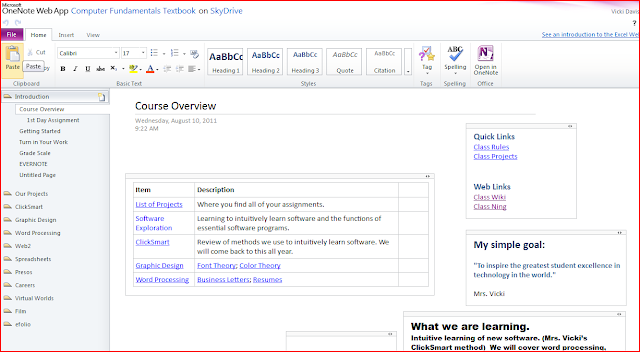
View on One Note notebook in Skydrive from a computer that does not have One Note Installed

We had a challenge signing up for Windows Live ID's -- Windows Live ID service only allows 2 people from one IP address to sign up for their service in a 24 hour period! It took us 2 weeks to get my 90+ students into our one note notebook!  You can, however, use Microsoft's Live@edu setup which is their alternative to Google Apps for Education. We've been on Google apps, though with no plans to switch at this point and so live@edu setup by importing a csv file was not for us. To work around this problem, the only solution they could offer was for me to bring in my mi-fi hotspot. I had students register on my iPad on the hotspot and reset the hotspot every 2 sign ups. YES, it was cumbersome. It is worth it for me, but I don't recommend it for you. Needless to say, we had a great discussion about IP addresses, spammers, and how the Internet routes data.

AFTER Windows works through this problem, I highly recommend that every class have their own class notebook. As much as I love Evernote for keeping my files, nothing compares to One Note for taking notes in class. If you want to link One Note on the ipad, the One Note app is decent but right now Mobile Noter is a better app for this.

You can see the project page for this assignment.
the software exploration assignment and on the left you can see some of the programs my students shared.


Blender - A student showed the basics of Blender, the 3D object creation software and also showed a famous movie filmed entirely in Blender. We discussed machinima. I noted that there is a lot of interest in this but mentioned how the mesh objects here could be exported and imported into our Open Sim Island and also the Jibe worlds that we'll be working with this year. (I'd like them to have their own 3D virtual world embeddable on a  web page in their personal portfolio using Jibe. Great tool.) The students agreed that this is definitely a higher end program. We also discussed Geometry and how the x,y,z axis are important in 3D work. They seemed surprised to see that Geometry had real-world uses.

Google Sketchup - Another 3D object creation tool, the students shared with their friends. The students LOVED how you can import 3D objects stored in the special google search engine for 3D objects. They were excited to pull in these objects and realized that they can export them into virtual worlds just like on Blender.

After this student presentation, I took the boat that they pulled in and figured out how to export as 2D (I wanted them to see how I figured this out as I haven't used Google Sketchup before) - I adjusted the camera a tiny bit and took about 10 pictures that I exported into a folder entitled "boat zoom" and pulled them into Pinnacle Studio to make a small 1 second clip zooming in on a boat. This was a demonstration of how easy it is to film machinima - just moving objects a small bit at a time and exporting the image. I think this is something they now see and feel is doable.

Audacity - This group demonstrated how to hook in our M-Audio Podcast Factory microphone into the computers and imported some audio and showed how to record over, edit the voice, remove things, and apply filters. They also demonstrated how to run an instrument app on an ipad or ipod Touch and record into audacity.

(I had to take a side trail and talk about what a male to male, male to female, etc. cables are and how to tell and ask for them -- it is a 'fact of life' that they need to understand the different kinds of cables (pardon the pun)).

I have to get a splitter so they can hear what they are recording as they are recording it because for some reason our MAudio box isn't letting us record the ipod/ ipad through the mixer box although you can hear it through the headphones. The presenters shared a song that they had remixed and I talked about how the award winning cheerleading squad from last year had mixed their own music in the computer lab using audacity.

We also spent time talking about DRM protection and a student with an ipad shared some about mixing in Garage Band on the ipad and Mac and how it is different from Audacity. We also talked about how to understand file extensions and look up what various types of files are. (This takes CONSTANT reinforcement.)

TuxGuitar - This group went all out. This program is for writing sheet music off of guitars and was a new one for me. You play the guitar shown on the screen and the program writes sheet music. This team also showed how to find midi music and import into Tux Guitar and to turn off and on tracks. We then hooked the computer with Tux Guitar into another computer running audacity and they realized how they could write, edit, use midi files on one computer and then record the track into another.

Synthesia - This game was brought in by the Tux Guitar students. They had learned everything about Tux Guitar and wanted to bring in this program. This teach-yourself piano game uses the computer keyboard but could use a real keyboard. They talked about how you can learn how to play almost any instrument.

So, I took them to one of my favorite Kevin Honeycutt videos about using the ipod/ iphone as an instrument. We discussed the evolution of music.

Whew! Just two days. Note that all of them have screenshots and instructions for the "computer user manual" we have built in one note.

Then, we went into photography with Picasa, learning how to take pictures on our webcam and a discussion about resolution (or rez), Picnik (the online photo editor integrated with Picasa) and also about the sort of scary "Face finder" service now integrated into Picasa. We discussed how our Face is now a fingerprint of a sort.

 We then moved into Skype. It was fun on the Skype session as I have the whole class get up on Skype. This is important to me because if I am ever out of town or home sick (or home taking care of a sick child which is more often the case,) I am able to skype into class to help students with issues. I'm really always "there." We learn how to group skype, but then I take my iPad and three boys into the library and have them skype back to the class. Then, I give them permission to take the class on a 4 minute tour and they take my ipad around and say hello to the librarian, the teacher coming from the copier. We discuss the mobility of VIDEO connection. This is a fun conversation.

Oovoo - The students asked that I install Oovoo on several computers because they wanted to compare and contrast Skype with oovoo which lets you do 12 way video chat. The kids say they really like Oovoo and are using it heavily.

Google Plus - Seeing some similarities between Oovoo and Google plus, it was then that I took them into Google Plus and ended up with a whole side conversation about tagging people. (See My Google+ Lesson Turned into a Whole Lot More than I had planned.)

We are just getting into the other class but I'm excited that three of our young ladies have jumped into Scratch and are loving it. They will teach the class today.

What is the purpose?
Before this, I have already laid the groundwork of my paperless classroom, how to print to PDF from word or any application, how to open into Google docs and save down from Google docs. How to move files around and organize them.

With this project, I am:
  1. What is this class of students interested in? How do I reach them
  2. Do they already have any prior knowledge of a program that I can build upon
  3. Can they learn to use forums and help resources when they have no prior knowledge? If not, I guide them in the learning process about how to FIND resources and people when they don't have prior knowledge.
  4. I set the stage for students-as-teacher and discuss presentation skills.
  5. I let them start and share with each other and then I build upon that with certain things I want them to know.
  6. We set the stage for super fast student-empowered learning where the tool is less important than finding a tool that will do what you want. The artifact we are trying to create becomes more important than the program we are using.

Surely, such planning seems like chaos to many, however, since I've started the year with this, I've found that I'm spending less time at the front of the room droning on and more time actually getting into the meat of the projects that make this such a fun class to teach.

I want them to be master of technology NOT the other way around.

Where this will lead.

The Freshman Project
I've gotten approval for a "Freshman project" of the student's own deciding due next May that will take 30-50 hours of time (I will give 30 hours of class time) that will be self-directed independent projects of the student's own choosing. This is modeled after the "senior project" idea in Evansville, Indiana that inspired DanTae in the video at the top of this blog post.

We must find student interests and help relate technology to turbo charge their careers and lives before they even graduate.


Flawed and imperfect as it is, the 6 class days required to do this activity start my year well and with a powerful message that we are in this together. Learning together.

Pushing forward into a future that is not yet written we will lead and no longer complain when our software is upgraded on us because we have powerful decoding skills that will let us master any app in our digital destiny.


Enhanced by Zemanta

Read more »

Sunday, July 3, 2011

Does Everyone Need to Understand Technology? You be the Judge

Wi-Fi Alliance logoImage via WikipediaWe don't just need tech geeks who understand technology we need doctors, lawyers, lawmakers, teachers, workers, and my goodness we need judges.

Update on July 5: I have a backchannel conversation going on with a lawyer who is helping me understand the nuances of what this judge has written. I still admit that I don't understand how radio is not radio, but what I'm learning is that the original law is written in such a way that it did not even consider that wi-fi could emerge and now we're stuck with archaic laws and trying to make modern technology work through. My intent was not to demean this particular judge or this profession. My favorite uncle is a lawyer.

A judge has just segmented radio communications in a way that has many in technology circles scratching their heads. According to the Technology & Law marketing Blog:

  This case is a fairly typical "technological convergence" case where we try to interpret technological terms in a statute in light of unanticipated technological evolution. Congress couldn't conceive of private WiFi back in 1986, so the statute doesn't fit the technology very well. Personally, in light of modern sensibilities, I think "radio" most naturally means the entire wireless spectrum. Judge Ware saw it differently and found reasons to separate out pieces of the spectrum for differential statutory application. I could see other judges reading the term more broadly on appeal.

This reminds me of when someone spoofed my email and sent over 100,000 email messages to people in my state saying "come see me here nude" (trying to defame me) back in 1996 and no one would do anything because no one understood what I was talking about. We need people of all professions to understand and work with technology.

The bottom line is that we now have laws written some time a go and judges who have to struggle with the technology to interpret those laws and we're coming up with pretty convoluted, hard to understand things that go against common sense.

How do we update? I think it starts with us as educators.We have to make sure our students understand technology so that they can go on to be lawmakers, lawyers, judges, teachers, and all professions who can help us upgrade our world (including the laws that govern us.)

Do your students understand?

The question for you as an educator is: if a student graduated from your high school would they understand what wi-fi is and how it works?

If they graduated from your college would they know this?

One who does not understand technology increasingly looks uneducated no matter their field. This includes education, my friends.

This is increasingly important if for nothing else, the nature of the blogerati who by-nature are techno-literate,  cover non technology fields like law or politics and a person makes an obvious technology bumble, they are all over it like flies on yesterday's watermelon rind.

Those who have labeled such things "geek" and put them in a box that shall only be opened by those social misfits who dare not show their face at Friday night's football game- are doing their schools, families, and friends a disservice. It is time to stop talking "geek" and just talk about things we need to know. We didn't call a person who liked to fix cars a geek when that revolution happened. They were welcomed as people who brought benefit to us all.

We also need to have people who don't think they know everything and can look for more information when they are lacking. While talking to my husband about this in the car, he said,
"A truly educated person is one who recognizes his limitations and knows when to go find answers."
Exactly.

Time to stop labeling and start learning. Technology is here to stay and just going faster. It isn't that hard to understand if you take the time to look past the jargon and know that this is understandable even though it is invisible.

Update: I rarely edit posts, however, when I do I let you know. I have been talking to someone who feels that I disrespected the judge in this case in a way that was demeaning and that I did not have a full grasp on the issue. First of all, I admit that this case is a bit more confusing that it seemed to be initially from my reading. However, I also want to point out that others are much more harsh than I was on this case.

That being said, it is important that all people are treated with respect. I do think this judge spent hours and is trying to do a good job. He is working with an antiquated law. Does it mean that the law is to blame or the judge or anyone? I was once in a wreck where a lady hit me because she was playing with her poodle. My car was damaged even though it wasn't my fault. I do think that this could be one of those lose-lose circumstances. Judge Ware may be right as rain but the original law stinks and thus his interpretation which may be truer to justice still smacks of a misunderstanding of radio.

The most important thing is that I choose to be respectful here. I'm not perfect nor will I ever be. If I make a mistake, I'll work hard to correct it. I cannot guarantee that I'll agree with you nor you with me but we can disagree in a way that brings honor to the human race.

I've edited, but the point still stands: we all need to understand technology. We are living in a society that is having a struggle transitioning to a digital world and we all need to know not only how technology works but how to treat people in a respectful manner.  
Enhanced by Zemanta

Read more »

Wednesday, May 25, 2011

A Beginner's Guide to Tumblr

Tumblr is a blogging platform that is sort of a cross between Twitter, Facebook and full-scale blogging. While some might use Tumblr as a full blogging platform, from reading a free e-book I picked up on Kindle about the topic (the book isn't free any more btw.)

The growth of Tumblr is surprising.

"Facebook and Twitter have dominated social media in recent years, but a study released by Quantcast Media Analysis has revealed that Tumblr is growing at an outstanding rate, now bringing in more than 250 million views per day spread across almost 19 million blogs. Perhaps even more interesting is that 51% of those views come from males as opposed to females.
When I mentioned working with Tumblr, I got back several tweets like this one from Leslie Healey


Why  Tumblr? How is it different from blogging?
Those of you who read this blog know that I always have 3 things on my list as part of my intentional R & D. When I sit down to "surf" - I focus on learning more about those things. Tumblr has been the object of my learning for some time. I started the blog on August 16th of LAST YEAR. But I just didn't understand. Now, I think I'm getting there.

So, to understand something like this, it is helpful to look at the "experts" who are using it well.


Asking Questions Is Easy
Tumblr isn't really a different way to blog. It is a blogging-y way to have conversation.

Like, this morning, I logged into my Tumblr dashboard and saw I had a message from a teacher friend, Alida Hanson, from Twitter who jumped on my Tumblr tweets to teach me.

I've been posting screenshots of my favorite apps from the iPad on my tumblr (oh  I love BookCrawler!), so Alida asked this question and I replied.

While the box you use to reply is painfully small, the process of being asked and answering a question was incredibly easy to do and share to everyone. Go ahead, ask me a question.

Also, as you follow people and they post something cool, then you can turn around and easily reblog it on your own blog. (Like I did with Alida's comiclife for the Bookfair, plus I mentioned you can now get comiclife on the ipad) So, your Tumblr blog becomes sort of a curated group of posts.

Other Facts About Tumblr
  • People can also submit posts to your Tumblr as well.
  • It is interesting how you can follow tags, like I'm following the tag for privacy settings.  
  • I'm finding that the privacy settings of Tumblr show a lot more promise than Facebook and am looking for some friends to help me test them.  
  • You can also easily have a group of people write your blog.  
  • You can use Disqus commenting.
  • You can use a phone number to call in audio to your Tumblr blog.
  • They have a great app for the iphone/ itouch and other devices to add easily.
  • Finally, some don't realize that you can host Tumblr on your own server.

    While I wouldn't recommend it for long, full blogging like here, some do exactly that. I think Tumblr has a purpose.

My Purpose for Tumblr
For me, I plan to use Tumblr as a way to engage in conversation with you. To throw in the many things that just don't make it into a formal post here on the Cool Cat Teacher blog. I know who I am here on this blog and I want to write one or maybe two high quality posts a day in several areas.

I don't want to be a 10 post a day smorgasbord of "stuff" here. Maybe that "hurts" blog traffic but my Mom always says that the more you talk, the less you are heard. I'm a full time teacher and don't have the time nor desire to be a one woman wall street journal. I'd rather be a one woman inspiration for educators around the world. ;-)
    Getting Started with Tumblr
    I waited to write until I started getting it. I haven't promoted it yet (until now) because I wanted to share with you the "back end" work that I did to tweak it.

    Sign up for an account http://www.tumblr.com

    I kept my URL the same as my blog http://coolcatteacher.tumblr.com - I may change the domain later but for now, that is what I'm using.  (Yes, it has an RSS, you can go ahead and subscribe if you want to.)

    Meet "The Dashboard"
    The Tumblr Dashboard lets you select the type of post you want to make and will format it for you. The other people who you follow will also feed through this dashboard, but you can filter them out if you wish.
    Tumblr Dashboard for entering posts.

    Again, this type of blogging is really neat for the small "snippets" and sort of lifestreaming but also part of the power is in grabbing posts from others and making them part of your own tumblr page (without any issues with citation, etc.) It is great to tumble up other people's "stuff" on your tumblr blog as you will see.

    But Vicki, you're just getting started, you're a Tumblr noob!
    Yes, I most certainly am. And that is the beauty of it. I'm taking you along with me. From Ground zero to whatever ends up. I do have one other subscriber but I think that happened when I was tweeting out of Tumblr. ;-)  (Update, I now have 4 twenty four hours later. ;-) But I am following 26 people as well.)

    Customize Your Tumblr
    Click Customize on the right hand side.

    Tumblr Customization Screen

    Click Info.
    First you want to have a description. To have a description you want to know WHY you're on Tumblr in the first place. Is it to experiment? Is it to share? Is it going to be the more personal side of you? See mine on the right side of my Tumblr.


    OK, one more tweak to info and then on to the next thing. I've uploaded my profile picture, put in my description. Now, I need to do a tweak or two on my feed.

    Tip: If you want to see what you're doing to your site, you CANNOT see it from the dashboard or customize screen very well. Open up another screen with your full URL (mine is http://coolcatteacher.tumblr.com) and then click save and go back and refresh that screen to see your changes.

    Click Theme.
    You'll want to Pick a Theme.

    It looks like you have to pay for a custom theme. You don't. Scroll down to the bottom and pick one that is free until you know what you're doing. I picked one that let me add my facebook page on the right.

    Click Appearance.
    Do this AFTER you pick your theme. You can also set up disqus here for commenting. You'll have to log into disqus and set up the blog and copy the unique disqus id for the blog to paste in the appearance tab. You may also have a byline and other information depending on the theme you selected. This is where I pasted in the link for my facebook page for this template.

    Click Pages.
    How to add a redirect page. you MUST check show a link.
    I added pages that redirect to my other sites: my blog, my Twitter, my full website. No need to repeat things and have another place you forget to update. One place for updating. That is easier. The way to do it is shown in the screenshot.

    You can also set up full pages as well if you want to. Where these links show depends upon the theme you picked.


    Click Services.
    Optimize Your Feed and Other Services

    This tab is where you link to Twitter, Facebook, set up your feed, and import links from other sources.

    A word about your feed.
    It is amazing to me how many people move from one blog to another and lose all their subscribers! They ask everyone to resubscribe on the new blog. There is no reason for that.
    My Feedburner Dashboard.

    Use Feedburner to control all of your feeds. Just log into Feedburner (use your Google account) and set up a new feed for your Tumblr Blog.  Mine is http://feeds.feedburner.com/CoolCatTeacherTumblr
    (Yes, you can click on it and subscribe if you want to in your reader.)

    Also, I do want the blog posts I slave in over here to end up on tumblr at least as a link. So, I put in the feed from this website into RSS import and also my Youtube channel so that the teacher interviews I do will hit tumblr as well.

    I am Tweeting OUT of Tumblr but not  into Tumblr. I turned Twitter out of going into Facebook some time a go. There is a reason for each thing I do and it isn't to overload people who engage with me. Be careful or you'll end up with endless loops between social networks.

    Click Community.
    This is the coolest part of Tumblr to me. I've gone in and allowed people to ask me questions and also set it up so you can submit your own posts. You can see what I'm asking for. This may change over time.

    So, quick. Someone help me test it out and submit a review or screenshot or something about teaching! Let's learn about how this works together!

    Note: I did have to put things in bold using HTML coding. I also think it is fine to be up front with who you are. Be original. ;-)

    Advanced.
    Lots of goodies here including making your photos high resolution and whether you want to be indexed by search engines.

    Go back to your Dashboard.

    Find Your Friends and Look at the Goodies
    I went over to the Goodies button. There, I found my friends and found 22 people who are in my gmail that are on Tumblr and followed them.

    I set up the PIN number for calling in audio and programmed that into my telephone. I also put the email address into my email account so I can email in links and photos (from zite, etc. if I cannot send to instapaper.)

    I set up instapaper to post to my drafts in Tumblr as well. (As of this post, it isn't working yet.)

    So, let's learn about this tool together.  I plan to come back and update and let you know where I am with my beginner's journey into tumblr.

    4/24/2011 - 1 followers 0 following
    4/25/2011 - 4 followers, 26 following

    Checking in
    When you look at your dashboard look at who is following you and follow back if you wish. See if you want to post any of their items to your page with a reblog. Also look for "messages" which are often questions. Enjoy!


    Let's Learn Together
    And we begin. Let's tumble together. Please share your tumble blog here or over on Tumblr.

    Let's learn together. With the robust privacy settings of this platform, we may just have a winner for education that the kids are already loving and that we should look at as well.

    http://coolcatteacher.tumblr.com/

    While I don't recommend leaving your blog for tumblr, sit down and pencil out your purpose for each before you start. It will help you focus. It has always worked for me. Hope you enjoy the beginner's guide written by a beginner who is on her way to learning more.
    Enhanced by Zemanta

    Read more »

    Wednesday, May 11, 2011

    $20 Laptops for Students from Google: The Questions to Ask

    Google Chrome IconImage via WikipediaGoogle has announced to Forbes that it will begin renting laptops for $20 a month to students. (I cannot find the age of the students, thus some questions below.)

    Running the Chrome OS, Google plans to use this as a testbed for enterprise companies.

    As General Manager for Cellular One in the 90's - my staff and I knew that the whole future of our company was to get our service in people's pockets. A person has a vested interest in their phone number.
    .
    You also have a vested interest in your documents, your email, your photos. If Google can capture these interests when a student is "young and broke" (and some would say foolish) they they have the student for life in their cloud.

    I wouldn't be surprised if some schools jumped in with this as well.

    This isn't a bad thing but free rides don't exist.
    Attribution Some rights reserved by Eleaf

    Ask questions and get answers before you sign any dotted line, especially on behalf of your students and children.

    The biggest issues revolve around disclosure to parents and privacy.

    Terms of Service. 
    You have to be eighteen to enter into a legally binding contract. Google Terms of Service confirms this in the first paragraph:
    "If you don't have the legal authority to bind, please do not click the “I Accept” button below."
    Are minors going to be accepting these terms?

    Most students and most people aren't reading terms of service. Most parents have their students setting up their own laptops.

    Parents need full disclosure about what terms they are accepting on behalf of their child.  There is no place I've seen where we put our age in on Google. If a parent is clicking "I accept" on behalf of their child then, I assume Google assumes that they are 18. We know this is not true.

    Privacy.
    Do students understand their privacy settings? Privacy rights according to terms of service?

    Are parents given oversight into these issues? Are they receiving disclosure?

    Capability
    Students and parents need to understand school requirements. When netbooks became in "vogue" I had many students bring them to school only to learn that they couldn't really run the Internet and Microsoft Word at the same time. They definitely couldn't make movies.

    Understand what you need to do before purchasing.

    Ability to lock down and restrict access.
    As more devices proliferate, the ability to secure and keep private our data increases.

    Monitoring
    Do parents know how to monitor? Do they have access to the machine through a userid and password? How about the cloud accounts?

    Technically, a child could set up the machine and the parent would have no access to their data. Typically, no one realizes this is an issue until it is too late or until a problem happens.

    Access.
    Will schools allow students to print from these devices? Access their wifi?

    OK, schools, so most parents understand your reasons for banning cell phones. How are you going to justify banning these handy devices?

    Are schools ready to set them up for students when they want to bring them to school? Are we going to ban these devices too? (And why should we?)

    Antivirus
    Viruses are always a problem. With massive numbers of students (who notoriously don't update antivirus and go to sites where viruses and trojans abound) using these, will they become easy targets?

    Return and Warranty.
    I'm assuming nothing is stored on the hard drive. If it is, however, and the computer crashes, how much is too much? Google will find that certain people always tend to have problems.

    The less someone pays for something, the less they care for it. Surely there has to be a penalty for negligence. Parents need to know what it is.

    Data Collection.
    The ability to opt out of tracking, etc. especially for younger students is very important. This has been ignored on many cell phones but is an issue for all of us on all devices. Google Adsense. Tracking cookies. We have laws protecting young children.

    GeoLocation and GeoTagging.
    Many cameras, etc. Geotag. This tiny piece of data reveals the exact latitude and longitude where a photograph was taken.

    I think services that allow geotagging should turn off the service for photographs as a default until a child is a certain age. This should be disclosed to parents.

    Digital Citizenship.
    Most schools block everything. You're looking at massive numbers of students going online. Digital citizenship cannot be ignored. It is time to have it in every school. Immersive learning projects such as Digiteen should be in all schools.

    Virtual School Infrastructure.
    With more students having access, the ability to visit their classrooms and schools virtually is increasing in importance. Online gradebooks, online classrooms, online forums are important as well as the behavior in those spaces.

    Bandwidth. Bandwidth. Bandwidth.
    Can there ever be enough? You can't get in the cloud if you're stuck on the ground.

    Kids in the Cloud
    The fact is that kids under 18 are all over the cloud. Kids under 13 are all over Facebook. I've seen 7 and 8 year olds there. We can't pretend it isn't happening. Now that cloud computers are being targeted for children it is time to look this issue square in the eye and grow up about how we treat children on the Internet. They are not mature adults yet.

    Sure, some of these are questions that already exist today.

    Share Alike Some rights reserved by openDemocracy

    When technology gets less expensive and in the hands of more people, we have to know that ignorance is not bliss.

    Ignorance is a problem when considering technology. The devil is in the details.
    Enhanced by Zemanta

    Read more »